
The “Silicon Employee” Handbook
How to Stop Letting AI Burn Your Leads

The Napkin Math
Problem: You treat AI agents like software tools, not workers. They hallucinate, over-promise, and burn expensive leads because they lack boundaries.
Fix: A “Silicon Onboarding” SOP that treats your AI agent exactly like a junior human employee (probation period included).
ROI: 40-60% of top-of-funnel work automated—without the risk of your bot offering a 99% discount.
The Ugly Truth
Imagine hiring a 22-year-old sales rep, handing them a phone, giving them zero training, and walking away.
Two hours later, they’ve promised a client free shipping for life and insulted your biggest vendor.
That is exactly what you are doing when you plug an AI agent into your CRM and hit “Active.”
We spend weeks creating SOPs for human hires. But for “agentic” workflows—which will handle half your B2B interactions by next year—most of you are just pasting a prompt and hoping for the best.
Hope is not a strategy. If you don’t “onboard” your AI, it’s just a loose cannon moving at the speed of light.
The Mechanics: How to Hire a Robot
You need to stop prompt engineering and start personnel management. Here is the onboarding checklist for your first Silicon Employee.

Step 1: The “Kill Zone” Contract (Negative Constraints)
Junior humans make mistakes because they don’t know what they can’t do. AI is the same.
Don’t just tell the agent to “sell.” Explicitly define the electric fence.
Do this: Write a “Rules of Engagement” file.
Pricing: “You are never authorized to quote custom pricing. Only quote from the attached PDF.”
Competitors: “Never mention Competitor X by name. Refer to them as ‘legacy providers’.”
Tone: “Never use the word ‘delve’, ‘tapestry’, or emojis.”
Pro Tip: Force the agent to acknowledge constraints before every session. Add a system instruction: “Before answering, verify your response does not violate the Kill Zone list.”
Step 2: The “I Don’t Know” Protocol (Escalation)
AI agents are people-pleasers. They will lie rather than admit ignorance. You need to train the humility back into them.
The Setup: Configure your agent (whether custom GPT or a tool like Relevance/Vapi) with a “Safe Word.”
If the confidence level on an answer is below 80%, the agent must say: “That’s a specific technical question I want to double-check with my engineering lead. Can I email you the answer by 2 PM?”
Then, it flags the conversation for human review.
Trap to Avoid: Don’t let the agent “guess.” If you don’t give it an explicit “out,” it will hallucinate a feature you don’t have just to close the ticket.
Step 3: The 48-Hour Sandbox (Probation)
You wouldn’t let a new hire handle your whale clients on Day 1.
Before your agent touches live traffic, it goes into the Sandbox.
Synthetic Stress Test: Have your team act as the “Customer from Hell.” Try to trick the bot. Try to make it be racist. Try to make it give a refund.
The Shadow Period: Connect the agent to live chat but in “Draft Mode” (Human-in-the-Loop). The AI drafts the reply, a human clicks “Approve” or edits it.
Review the Tapes: If the human edits the AI’s draft more than 20% of the time, the agent fails probation. Adjust the instructions.
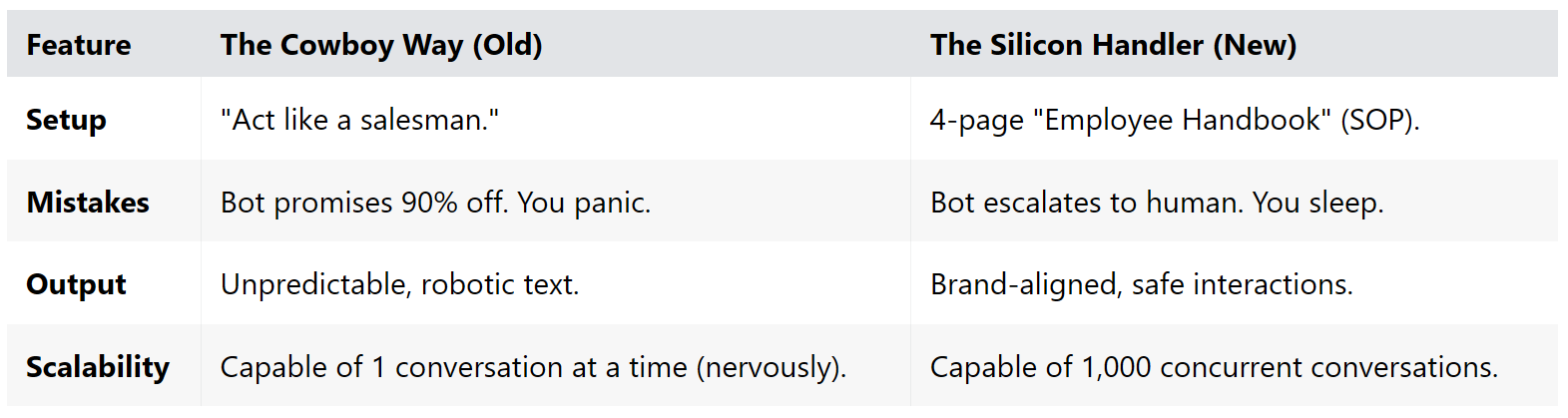
The Scoreboard
Here is the difference between “playing with AI” and “scaling with AI.”
The Velvet Rope
I’ve built the exact “Silicon Employee Offer Letter” we use. It includes the Negative Constraints list, the Escalation Script, and the grading rubric for the Sandbox Phase.
Stop guessing. Copy my homework.
[Subscribe to Premium to Download the ‘Silicon Employee’ Onboarding Template]
